Common Causes of Inaccurate Cut Length on Paper Cutting Machine
Datetime: 6/15/2026 10:39:00 AM Visit: 489
You’ve seen it before. The morning batch of printed sheets comes off the cutter, and something’s off. You measure—the cut length is 0.7mm short. The print registration is visibly drifting across the sheet. By the afternoon, the error has compounded into a full inch, and the entire run is heading for the scrap bin.
Cut length deviation beyond ±0.5mm can ruin printed pattern alignment and cause downstream folding, gluing, or packaging misalignment. Yet many shops waste hours recalibrating sensors or calling for expensive service calls when the real culprit is far simpler. Over 90% of inaccurate cut length issues trace back to seven mechanical or parameter problems—none of which require a factory technician to diagnose.
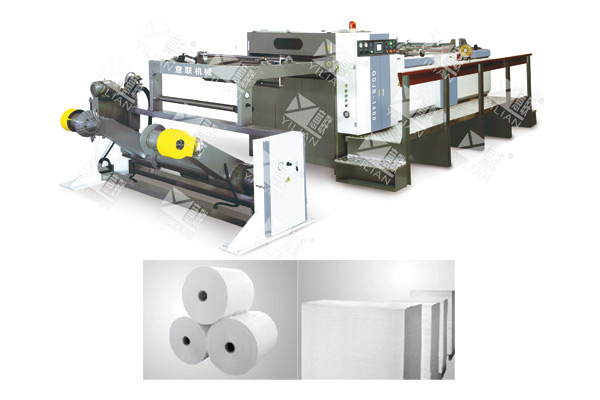
The paper cutting machine we‘re using as our reference here is the Winrich GDJB‑1400/1700 hob‑type servo‑driven computer paper cutter, which specs a cut length tolerance of ±0.5mm for lengths under 1000mm and ±0.1% for longer cuts. Even on a machine with precision bearings and AC servo drive, tolerance drift happens. This guide walks you through each common cause in order of how quickly you can check it. Most fixes take minutes, not hours.
Feed roller wear or low surface grip
Let’s start with the most common mechanical culprit. The feed rollers (sometimes called pinch rollers or pulling rollers) grip the paper and pull it through the cutting station. Over time, the rubber or urethane surface wears smooth, or paper dust builds up, reducing friction.
What it looks like in production
The most telltale symptom is cut length that gradually gets shorter—because the rollers are slipping, the actual paper feed length is less than what the encoder counts. On a high-speed machine running coated paper, this slippage can accumulate cycle after cycle, with each cut falling a few tenths of a millimeter short of the previous one.
The chalk line test
Here’s a quick field check that takes thirty seconds. Mark a line across the feed roller surface with chalk or a white paint marker. Run the machine for 10 meters of paper at normal speed. Stop and inspect the roller. If the chalk mark is still fully visible and intact, the roller is gripping properly. If parts of the mark have been wiped away unevenly—or if the mark is gone entirely—you have slippage. One search result notes that insufficient contact force leads to roller slipping on the paper and feeding failure.
The fix
First, clean the roller surface with isopropyl alcohol to remove paper dust and adhesive residue. If slippage persists, the rubber may have hardened or glazed. In that case, replace the roller cover—or the entire roller assembly, depending on your machine’s design. For machines running slick coated stocks (art paper, cast-coated, or calendared paper), consider replacing standard rollers with grooved or knurled ones for better grip.
Encoder coupling looseness
The encoder is the eyes of your cut length control system. It translates the rotation of the feed shaft into electrical pulses that tell the PLC how much paper has moved. Between the shaft and the encoder sits a flexible coupling—a small but critical part that often gets overlooked.
Symptoms of a loose coupling
When the coupling loosens, the encoder’s readings no longer match the actual shaft rotation. The controller thinks the paper has moved a certain distance, but the real movement is slightly different. The result is cut length error that appears inconsistent and unpredictable—sometimes long, sometimes short, with no clear pattern. In complex working spaces, the coupling must compensate for deformation and misalignment changes in the joint shaft system and have extremely low rotational inertia to ensure high-speed start/stop performance.
How to check
With the machine powered off and locked out, reach into the encoder mounting area. Grab the coupling with your fingers and try to twist it in both directions. There should be no perceptible rotational play—just solid engagement. Also check the set screws on both ends of the coupling; they should be tight.
The fix
Tighten any loose set screws. If the coupling feels worn or shows visible cracks, replace it—standard flexible jaw couplings cost less than $20. When reinstalling, ensure the coupling is properly aligned and the set screws are torqued to spec. A misaligned coupling can cause encoder signal jitter and introduce noise into the pulse train. One search result emphasizes that after tightening the encoder stud nut, you must tighten the coupling’s upper socket head bolt without forcing the coupler out of alignment.
Brake not fully releasing between cuts
This cause is specific to clutch‑brake type paper cutting machines. Many older and mid‑range cutters use a friction brake to hold the feed shaft stationary between cuts. If the brake doesn‘t fully release when it should, the paper can’t feed freely.
The progressive shortening pattern
The classic symptom of a drag‑causing brake is cut length that gets progressively shorter with each cut—0.2mm shorter on the first, another 0.2mm on the second, and so on—until the error becomes obvious. The brake’s residual drag creates resistance against the feed rollers, pulling the paper back slightly after each cut. Over time, the effect accumulates.
Checking the brake
Listen carefully during the feed cycle. A brake that’s dragging often produces a faint rubbing or scraping sound. For a more definitive test, run the machine with the brake electrically disconnected (if safe and permissible) and observe whether the cut length stabilizes.
The fix
Adjust the brake clearance according to the manufacturer’s specification. If the friction disc or pads are visibly worn, replace them. Brake pad wear or excessive clearance prevents the cutter from stopping at the correct position; adjusting the gap or replacing the brake pads resolves the issue, as does cleaning and lubricating stuck clutch components.
Material slippage inside the feed table
Not all slippage is the feed roller’s fault. Sometimes the problem is the paper itself.
The slick stock problem
Coated papers (art paper, cast‑coated, glossy stocks) and calendared papers have very low surface friction. Under the weight of a full roll, the tension at the feed roller may be insufficient to overcome the material’s natural slipperiness. The result: the paper pulls away from the drive roller during the feed cycle, reducing the actual feed length. Slippery media is a possible cause for fault feeding.
How to confirm
Run a short test with a rougher stock—uncoated offset paper or kraft. If the cut length returns to tolerance with the rough stock but drifts with the slick stock, the paper is the variable.
The fix
Increase the pressure of the pinch rollers against the feed roller, but not so much that you crush or mark the paper. If your machine has adjustable pinch rollers, add one or two extra pinch roller assemblies across the web width. For extreme cases, replace standard pinch rollers with knurled or grooved ones that bite into the paper surface without damaging it.
[Image: Close-up of a feed roller with visible wear and glazing, alongside a new replacement roller, showing the contrast in surface texture]
PLC length input parameter distorted
Modern computer‑controlled cutters rely on parameters entered through an HMI. If those parameters are wrong, the machine will cut wrong—even if every mechanical component is perfect.
The most common mistake: roller diameter
The PLC calculates cut length based on the feed roller’s diameter. The controller multiplies the number of encoder pulses by the circumference of the roller (π × diameter) to determine how much paper has moved. If an operator has entered the theoretical diameter rather than the actual measured diameter, the calculation will be off. Even a 0.2mm error in roller diameter translates to roughly 0.6mm of cut length error per meter of paper.
How to verify
Get a tape measure and a fresh roll of inexpensive paper. Set the machine to cut 1000mm lengths (or the longest length your machine can reliably run). Run ten sheets and measure each one. Average the measurements. If the average is, say, 1002mm, your actual roller diameter is slightly larger than what’s programmed.
The fix
Use the actual measured average length to back‑calculate the correct roller diameter value for the PLC. The formula: new roller diameter setting = (target length ÷ measured average length) × current roller diameter setting. Enter the corrected value, run another test, and iterate until the cut length is within tolerance.
Many modern machines also have a “calibration” or “adjust” screen that allows you to directly input a compensation value. For example, if cuts are consistently 0.5mm short, you can input “+0.5” on the adjustment screen to correct the error without recalculating the roller diameter.
Vibration affecting proximity sensor
This cause is subtle and often misdiagnosed. The sensor that detects the cutting position or the registration mark can be fooled by external vibration.
The intermittent error pattern
If your cut length error comes and goes without any obvious pattern—fine for an hour, then suddenly three bad cuts in a row—suspect vibration. The problem is especially common in plants where heavy stamping presses, compressors, or other impact equipment share the same concrete slab.
How to test
With the machine running but not cutting, tap firmly on the machine frame near the sensor. Watch the sensor’s indicator light. If it flickers or changes state with each tap, the sensor is too sensitive to vibration. Also check whether the error correlates with the operation of nearby machinery—if the stamping press runs and the cutter immediately starts miscutting, you have your answer.
The fix
The best solution is physical isolation: move the cutter to a different part of the floor, or install vibration‑damping pads under its feet. If relocation is impossible, replace the standard proximity sensor with one that has adjustable time‑delay filtering. A sensor with built‑in debounce circuitry ignores brief signal fluctuations caused by vibration.
Worn knife damping rubber
This is the cause that almost no operator thinks to check. Under the cutting knife—or at the point where the blade meets the cutting anvil—there’s often a strip of urethane or rubber. Its job is to absorb the impact of the cut and prevent the paper tail from snapping back.
How a hardened damping rubber affects cut length
When the damping rubber hardens or cracks, it can no longer absorb the cutting shock. The paper tail rebounds upward or backward as the blade passes through. That rebound shortens the effective cut length. The problem is subtle—sometimes only 0.2mm per cut—but it adds up over thousands of cycles.
How to inspect
Examine the damping strip. It should feel pliable, like a firm eraser. If it feels rock‑hard, leaves a dent when pressed with a fingernail, or shows visible cracks, it needs replacement. In some machine designs, the damping rubber is located on the cutting anvil or on the paper hold‑down bar.
The fix
Replace the damping rubber with a strip of the correct durometer—typically Shore A 60‑70 for paper cutting applications. Softer rubber absorbs more shock but wears faster; harder rubber lasts longer but may not fully damp vibration. Use the manufacturer’s specified hardness. A fresh damping rubber often restores cut length tolerance immediately.
Below is a quick reference table for matching symptoms to likely causes:
| Symptom / Error Pattern | Most Likely Cause | Quick Check |
|---|---|---|
| Cut length gradually gets shorter | Feed roller slippage | Chalk line test |
| Error is inconsistent, no clear pattern | Encoder coupling loosened | Twist coupling by hand |
| Each cut is 0.2–0.5mm shorter than previous | Brake not fully releasing (drag) | Listen for rubbing; test with brake disconnected |
| Error appears only with coated or glossy stocks | Material slippage from low friction | Compare with uncoated stock; inspect pinch rollers |
| Error is consistent but offset (always 1mm short) | PLC roller diameter parameter wrong | Measure actual cut length; back‑calculate correct diameter |
| Error comes and goes, often with nearby equipment running | Vibration affecting proximity sensor | Tap frame near sensor; watch indicator light |
| Subtle error (~0.2mm) that disappears with new damping pad | Worn knife damping rubber | Press nail into rubber to check hardness |
Questions operators ask when cut length drifts
Q: Why is the error bigger at high speed (100 cuts/min) than low speed?
A: This almost always points to a mechanical response issue—usually brake release delay or feed roller slippage. At higher speeds, the mechanical components have less time to complete each movement. If the brake is dragging slightly, it restricts paper flow more at high speed than low. If the feed roller is slipping, the effect multiplies with higher acceleration. Run the machine at 50% speed for a test batch. If the error shrinks or disappears, you have a mechanical speed‑dependent problem, not an electronic one. In production environments, this is why speed changes should be made gradually—load and inertia changes during acceleration and deceleration cause corresponding increases in error.
Q: Can the digital length display be wrong even if the physical cut is correct?
A: Yes, but it’s rare. The digital display reads the encoder pulses—it shows what the controller thinks is happening. If the encoder coupling is loose or the sensor is faulty, the display can show perfect numbers while the actual cut is wrong. Conversely, the display can show errors that don’t exist in the physical sheet if there‘s noise in the encoder signal. Trust your tape measure over the screen. In paper cutting, the relationship between feed roller and cutter is essentially a high‑precision speed ratio control; the goal is to keep cut length within the error range without requiring printing‑press‑level position control.
Q: Does humidity affect cut length on a paper cutting machine?
A: Indirectly, yes—and more than most operators realize. Paper is hygroscopic. On a humid day, paper expands slightly across its width and length. If your cut length tolerance is ±0.5mm and the paper has swollen by 0.3mm over a 1000mm run, that’s a significant portion of your error budget. For critical jobs, condition the paper in the production environment for 24 hours before cutting. Store paper rolls in climate‑controlled rooms (45–55% RH, 20–22°C) and allow them to acclimate before running. A roll that has not completely cured or has inconsistent moisture content will result in unstable cut lengths.
When to call for service
You‘ve worked through all seven causes. You’ve cleaned the rollers, tightened the coupling, adjusted the brake, checked the parameters, inspected the sensor, and replaced the damping rubber. The cut length is still off.
At this point, the issue may be in the servo drive parameters. Some machines require tuning of the servo response—the acceleration and deceleration curves that control how aggressively the feed motor starts and stops. Others may have a failing encoder that needs replacement. These fixes require manufacturer-level tools and training.
For Winrich GDJB‑1400/1700 series machines, the AC servo drive system is the heart of cut length control. The machine’s maximum cutting speed is 300 cuts per minute, with a maximum linear speed of 300 meters per minute. If the servo drive parameters are corrupted or the encoder fails, the machine may still run but will not maintain tolerance. In such cases, contact the manufacturer with your machine’s serial number and the specific error behavior. A support technician can often walk you through checking the servo parameters remotely.
Before you call, gather:
-
The exact error pattern (consistently short, progressively shorter, or intermittent)
-
The sheet length at which you’re seeing the error
-
The paper type and weight (GDJB series handles 60–550 gsm paper)
-
Any recent maintenance or part replacements
This information will help technical support diagnose the problem faster—and may save you a service visit altogether.
Troubleshooting cut length errors on your paper cutting machine? Contact Winrich Machinery with your machine model (GDJB-1400 or GDJB-1700), the measured error pattern, and the paper stock you’re running. Their technical team can provide parameter sheets, servo tuning guidance, and replacement parts for feed rollers, couplings, and damping rubbers.